

Introduction
Productivity Apps help users organize tasks, manage time, store information, communicate with teams, and complete daily work more efficiently. These digital tools are useful for students, freelancers, office workers, business owners, content creators, and anyone who wants to improve personal organization.
Modern life often involves multiple responsibilities, deadlines, meetings, messages, and documents. Managing everything manually can become difficult, especially when users work across several devices or projects. Productivity applications provide a central place to plan activities, monitor progress, and reduce unnecessary distractions.
However, installing too many apps can make work more complicated instead of easier. Users should select tools according to their actual needs, device compatibility, budget, privacy requirements, and daily workflow. This article explains the main types of productivity applications, their benefits, important features, and common mistakes to avoid.
What Are Productivity Apps?
Productivity apps are digital tools designed to help users complete tasks, organize information, manage schedules, and improve work efficiency.
These applications may support task planning, note-taking, document editing, file sharing, communication, time tracking, automation, and project management. Some apps focus on one specific function, while others combine several productivity features in one platform.
For example, a task-management app can organize deadlines, while a calendar application can schedule meetings and reminders. A cloud storage tool can keep files available across several devices.
The main purpose of these apps is to reduce confusion and help users focus on important work.
Benefits of Using Productivity Apps
Productivity applications can make daily work more organized and manageable.
They allow users to create clear task lists, schedule important activities, save ideas, and track progress. This reduces the need to remember every responsibility manually.
Cloud synchronization helps users access information from smartphones, laptops, and tablets. A task created on one device may appear automatically on another.
Productivity tools can also improve teamwork. Shared projects, comments, file attachments, and progress updates allow team members to collaborate more clearly.
The greatest benefit comes from using a simple system consistently instead of changing apps frequently.
Task Management Apps
Task-management apps help users create, organize, and complete daily responsibilities.
Users can add task names, descriptions, deadlines, priorities, reminders, and categories. Large projects can be divided into smaller steps, making them easier to manage.
Students may use these applications for assignments and exam preparation. Freelancers can track client work, while business owners can organize daily operations.
A useful task app should provide clear navigation and quick task entry. Complicated systems may require more time to manage than the work itself.
Users should review their task lists regularly and remove items that are no longer relevant.
To-Do List Apps
To-do list applications provide a simple way to record tasks that need attention.
They are suitable for shopping lists, personal reminders, study plans, office activities, and household responsibilities.
Users can arrange tasks by priority, category, or deadline. Some applications also support recurring tasks for activities that happen daily, weekly, or monthly.
A short and realistic list is usually more effective than adding too many tasks.
Users should focus on essential activities and avoid filling their lists with work that has no clear purpose.
Calendar Apps
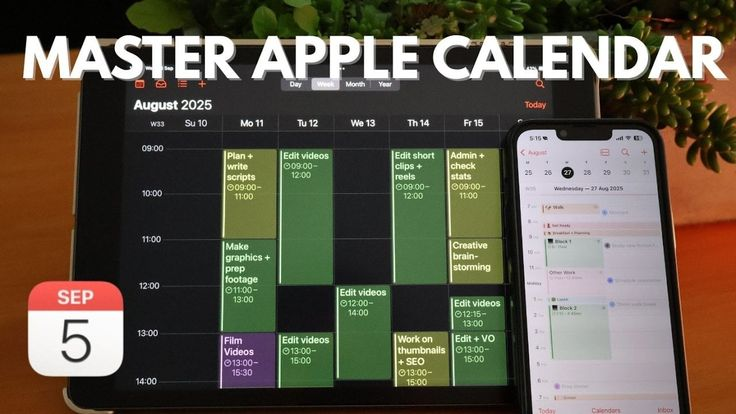
Calendar applications help users organize meetings, appointments, classes, deadlines, and important events.
They allow users to view their schedule by day, week, or month. Reminders can be added before an event to reduce the chance of forgetting it.
Shared calendars are useful for families, teams, and businesses. They help several people understand when meetings or activities are scheduled.
Users should avoid creating too many reminders because excessive notifications may become easy to ignore.
Important events should include a clear title, correct date, time, location, and any required preparation.
Note-Taking Apps
Note-taking applications help users save ideas, research, meeting summaries, client information, and personal plans.
Digital notes are easier to search and organize than loose paper notes. Users can create folders, labels, and categories for different subjects or projects.
Many note apps support images, links, audio recordings, checklists, documents, and handwritten notes.
Cloud synchronization keeps information available across several devices.
Sensitive notes containing passwords, financial details, or private business information should be protected with proper security controls.
Document Editing Apps
Document-editing applications allow users to create letters, assignments, reports, proposals, and business documents.
Modern tools support formatting, comments, templates, spelling checks, and online collaboration.
Several people can sometimes edit the same document and view changes in real time. This is useful for remote teams, students, and clients.
Before sharing a document, users should check spelling, formatting, personal information, and file permissions.
Important files should be saved regularly and backed up in a secure location.
Spreadsheet Apps
Spreadsheet applications help users organize numbers, lists, budgets, schedules, inventory, and business information.
They are useful for calculations, financial planning, reports, attendance records, and data analysis.
Beginners can use simple rows, columns, and formulas, while advanced users can create charts, automated calculations, and detailed dashboards.
Users should check formulas carefully because one incorrect calculation can affect the entire report.
Sensitive financial spreadsheets should not be shared publicly or through unsecured links.
Project Management Apps
Project-management applications help teams plan large projects and monitor progress.
Projects can be divided into tasks, deadlines, responsibilities, stages, and milestones. Team members can see who is responsible for each activity.
These tools may include boards, timelines, calendars, reports, comments, and file attachments.
Small teams should avoid selecting overly complicated software with unnecessary features. A simpler tool may be easier to maintain.
Project information should be updated regularly so that every team member sees accurate progress.
Team Communication Apps
Communication apps support messaging, calls, video meetings, announcements, and file sharing.
They help remote and office-based teams communicate without depending entirely on email.
Separate channels or groups can be created for different projects and departments. This keeps discussions more organized.
However, constant messages can interrupt focused work. Users should adjust notification settings and use status features when they need uninterrupted time.
Important decisions should be recorded clearly instead of becoming lost in long conversations.
Cloud Storage Apps
Cloud storage applications allow users to save files online and access them from different devices.
They are useful for backups, remote work, team collaboration, and document sharing.
Users can organize files by project, client, department, subject, or date. Clear file names make documents easier to find.
Sharing permissions should be reviewed carefully. View-only access is suitable when another person does not need to edit the file.
Strong passwords and two-factor authentication should be enabled to protect cloud accounts.
Time-Tracking Apps
Time-tracking applications show how much time users spend on tasks, projects, clients, or applications.
Freelancers can use these tools to calculate billable hours. Businesses can analyze how long projects take and identify inefficient processes.
Students may use time tracking to understand their study habits.
Tracking should support improvement rather than create unnecessary pressure. Users should focus on general patterns instead of monitoring every minute.
Clear categories and accurate project names make reports more useful.
Focus and Distraction-Blocking Apps
Focus applications help users reduce distractions from social media, games, notifications, and unnecessary websites.
Some apps allow users to create focused work sessions followed by short breaks. Others block selected applications or websites for a specific period.
These tools can be helpful during study sessions, writing, design work, or important business tasks.
However, focus applications cannot replace good habits completely. Users should also create a clean workspace, silence unnecessary alerts, and set realistic goals.
Long work sessions should include suitable breaks to maintain concentration.
Habit-Tracking Apps
Habit trackers help users monitor repeated activities such as reading, studying, planning, or completing daily work routines.
These applications may show progress through calendars, streaks, charts, or reminders.
Users should begin with a small number of realistic habits. Tracking too many activities may become difficult and discouraging.
Progress should be measured over time rather than judged by one missed day.
The purpose of habit tracking is to encourage consistency, not perfection.
Password Manager Apps
Password managers improve productivity and security by storing login details in one protected system.
They can generate strong and unique passwords for different accounts. This reduces the need to remember many complicated login combinations.
Users should select a trusted password manager and protect it with a strong master password.
Two-factor authentication should also be enabled when available.
Passwords should never be stored in unprotected notes, spreadsheets, or messages.
Email Management Apps
Email applications help users organize communication, search messages, manage attachments, and reduce inbox clutter.
Folders, labels, filters, and priority settings can separate client messages, payments, newsletters, and business updates.
Users can schedule dedicated times to review email instead of checking it continuously throughout the day.
Unnecessary newsletters can be unsubscribed from, while suspicious messages should be reported as spam.
Important emails may be archived rather than deleted so they remain available for future reference.
Automation Apps
Automation applications connect digital services and perform repeated tasks automatically.
For example, a file attachment may be saved to cloud storage, a form response may create a task, or a scheduled message may be sent automatically.
Automation can reduce repetitive work and improve consistency.
However, users should test every automated process carefully. An incorrect setup may send the wrong information, create duplicate records, or expose private data.
Simple automation should be introduced first before building complicated workflows.
Apps for Students
Students can use productivity tools to manage classes, assignments, notes, study sessions, and research.
Calendar apps can store exam dates and deadlines. Note-taking apps can organize information by subject, while cloud storage protects assignments from device failure.
Focus tools may reduce distractions during study time.
Students should avoid relying completely on digital tools. Understanding the subject, reviewing notes, and completing independent work remain important.
Educational information should also be verified through teachers, textbooks, and reliable sources.
Apps for Freelancers
Freelancers often manage clients, deadlines, invoices, communication, and payments independently.
Task managers can organize projects, while time trackers can record billable work. Cloud storage provides secure access to client files.
Calendar applications can schedule meetings and delivery dates. Invoice tools may simplify payment records and financial organization.
Freelancers should maintain separate backups of important client files and contracts.
Account security is also essential because several business activities may depend on one device.
Apps for Small Businesses
Small businesses can use productivity applications to manage employees, customers, sales, inventory, projects, and documents.
Shared calendars help teams coordinate meetings, while project tools show responsibilities and deadlines.
Cloud-based platforms can allow owners and employees to access information from different locations.
Businesses should review pricing, privacy, user permissions, and data export options before choosing an app.
A company should not depend completely on one platform without maintaining backups of important records.
Apps for Remote Work
Remote workers need reliable tools for communication, file sharing, meetings, task management, and collaboration.
Video-conferencing apps support meetings and presentations. Team chat tools provide quick communication, while cloud documents allow shared editing.
Remote workers should create a clear daily schedule and separate work notifications from personal alerts.
Strong internet security and updated software are also important when working outside a traditional office.
Confidential business information should not be accessed through unsecured public networks.
Free vs Paid Productivity Apps
Free productivity applications can provide enough features for students, beginners, and individual users.
However, free plans may include advertisements, storage limits, reduced collaboration, or restricted automation.
Paid plans may provide advanced features, additional storage, priority support, and better team controls.
Users should understand whether pricing is monthly, annual, or based on the number of team members.
A free trial should be tested through real tasks before purchasing a subscription.
How to Choose the Right Productivity App
Start by identifying the exact problem the app should solve.
A user who needs simple reminders may not require a complete project-management platform. A business team may need shared tasks, reports, permissions, and integrations.
Compare ease of use, compatibility, pricing, security, offline access, and customer support.
The application should fit naturally into the existing workflow.
A tool that requires too much maintenance may reduce productivity instead of improving it.
Privacy and Security
Productivity applications may collect documents, schedules, messages, contacts, and business information.
Users should review privacy policies and requested permissions before creating an account.
Applications should be downloaded from official websites or trusted app stores.
Strong passwords and two-factor authentication should be used for important accounts.
Team administrators should limit access according to each employee’s responsibilities and remove access when it is no longer required.
Common Productivity App Mistakes
One common mistake is installing too many apps that perform similar tasks.
This can create duplicate notifications, scattered information, and unnecessary subscriptions.
Another mistake is spending too much time customizing the app instead of completing actual work.
Users may also create unrealistic task lists or ignore regular reviews.
A simple and consistent system is usually more effective than a complicated collection of tools.
How to Use Productivity Apps Effectively
Users should begin with one main app for each important purpose.
Tasks should be written clearly and given realistic deadlines. Calendars should contain only time-based activities, while general work can remain in a task manager.
Notifications should be limited to important reminders.
Users should review tasks and schedules at the beginning or end of each day.
Regular cleanup prevents completed tasks, outdated files, and unnecessary alerts from creating confusion.
Future of Productivity Apps
Future productivity applications are expected to include stronger artificial intelligence, automation, and personalized recommendations.
AI may help summarize meetings, organize tasks, draft documents, schedule activities, and identify important information.
Applications may also work more smoothly across smartphones, laptops, wearables, and smart devices.
Privacy and security will remain important as platforms process more personal and business data.
The most successful tools will likely combine simple design, reliable performance, useful automation, and transparent pricing.
Conclusion
Productivity Apps can help users manage tasks, calendars, notes, documents, communication, files, and projects more efficiently. They provide useful support for students, freelancers, remote workers, professionals, and businesses.
The right application should solve a clear problem, fit the user’s workflow, and provide strong security without adding unnecessary complexity. Installing too many tools can create confusion, so users should focus on a smaller number of reliable apps.
By selecting suitable applications, managing notifications, reviewing schedules regularly, and protecting account information, users can improve organization, reduce distractions, and complete daily work more effectively.