
Introduction
DIY Technology helps people understand, improve, and personalize their devices through practical projects and simple technical tasks. From setting up a smart home gadget to upgrading a computer, organizing cables, improving Wi-Fi, or maintaining electronic devices, do-it-yourself technology can save time and build useful skills.
Many tech projects do not require advanced engineering knowledge. With the right instructions, basic tools, and proper safety precautions, beginners can complete several useful tasks at home. However, it is important to understand the limits of DIY work because electrical repairs, damaged batteries, and complex hardware problems may require professional support.
This article explains useful DIY technology projects, safe troubleshooting methods, maintenance tips, and important mistakes to avoid.
What Is DIY Technology?
DIY technology refers to technology-related projects that users complete on their own instead of hiring a technician or purchasing a fully prepared solution.
These projects may involve installing software, upgrading computer parts, setting up smart devices, improving a home network, organizing a workstation, or building a simple digital system.
The main purpose is to solve a practical problem, reduce costs, or create a more personalized setup. DIY technology can also help users understand how their devices work.
A successful project requires planning, compatible equipment, trusted instructions, and careful testing.
Benefits of DIY Technology
DIY projects can help users develop confidence and practical digital skills.
Completing a basic computer upgrade, improving Wi-Fi coverage, or setting up a backup system can make everyday technology easier to manage.
DIY work may also reduce costs when the task is simple and safe. Instead of paying for minor setup services, users can follow reliable instructions and complete the work themselves.
Another benefit is customization. Users can design a system according to their own needs rather than accepting a standard setup.
However, saving money should never be more important than safety. Complex or dangerous repairs should be handled by trained professionals.
Start with a Clear Project Goal
Every DIY technology project should begin with a clear objective.
Instead of deciding to “improve the computer,” identify a specific goal such as increasing storage, reducing startup time, organizing files, or improving cooling.
A clear goal helps users select the correct tools and avoid unnecessary changes.
It also makes the final result easier to test. If the goal was to improve Wi-Fi coverage, users can compare signal strength before and after the project.
Check Compatibility Before Buying Parts
Compatibility is one of the most important parts of DIY technology.
Computer memory, storage drives, chargers, cables, smart home devices, and accessories may not work with every product.
Users should check model numbers, port types, operating systems, power requirements, and software support before purchasing anything.
A part may physically fit but still fail to work correctly because of technical limitations.
Official documentation and trusted product information can help users confirm compatibility.
Prepare the Required Tools
Simple DIY projects may require screwdrivers, cable ties, cleaning cloths, storage devices, adapters, or software tools.
All equipment should be prepared before the project begins. This prevents interruptions and reduces the risk of using unsuitable tools.
Users should avoid using damaged cables, loose adapters, or poor-quality chargers.
Tools should also be used only for their intended purpose. Forcing the wrong screwdriver or connector can damage the device.
Create a Backup Before Making Changes
A backup is essential before changing hardware, installing major software, editing system settings, or modifying a website.
Important photos, documents, project files, and account information should be stored securely.
Users can save files to cloud storage, an external drive, or another trusted device.
A backup makes recovery easier if the update fails, the device stops working, or a file is accidentally deleted.
Build an Organized Tech Workspace
An organized workspace improves comfort, safety, and productivity.
Users can arrange their laptop, monitor, keyboard, mouse, charger, and accessories so that everything is easy to reach.
Cable ties, clips, and labelled connections can reduce clutter. Power cables should remain away from walking areas and liquids.
Devices that produce heat should have enough ventilation. Laptops should not be placed on soft surfaces that block cooling vents.
A clean workspace can also reduce dust buildup and accidental damage.
Improve Cable Management
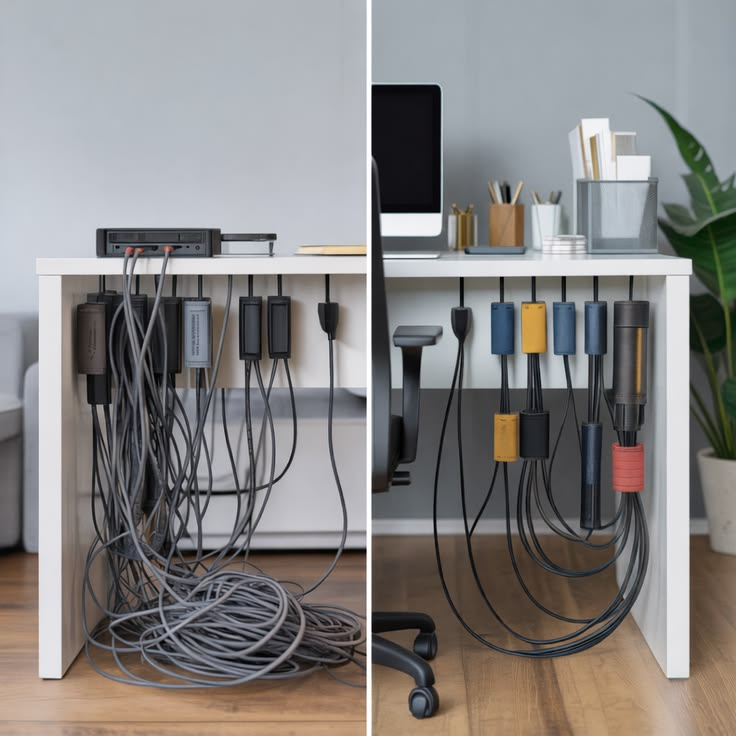
Cable management is one of the easiest DIY technology projects.
Users can group related cables, label chargers, and use reusable cable ties to prevent tangling.
Power cables and data cables should be arranged carefully so they are not pulled or bent sharply.
Frequently used chargers should remain accessible, while unused cables can be stored separately.
Good cable management improves appearance and makes troubleshooting easier because users can quickly identify each connection.
Set Up a Home Wi-Fi Network
A stable Wi-Fi network supports smartphones, laptops, smart televisions, and connected home devices.
The router should be placed in a central, open location. Thick walls, metal objects, and large appliances can reduce signal strength.
Users should change the default administrator password and create a strong Wi-Fi password.
Router software should also be updated when official updates are available.
A guest network can be created for visitors and smart devices to keep the main network more secure.
Improve Weak Wi-Fi Coverage
Weak Wi-Fi may be improved without replacing the entire network.
Users can move the router to a better position, adjust its direction, reduce nearby interference, or restart it.
Large homes may benefit from a compatible Wi-Fi extender or mesh system.
Before buying additional equipment, users should test signal strength in different rooms.
Placing an extender too far from the main router may result in a weak repeated signal, so location is important.
Create a Simple Home Backup System
A home backup system protects important files from device failure, loss, or accidental deletion.
Users can keep one copy on the main device, another on an external drive, and an additional copy in secure cloud storage.
Automatic backup tools can save files regularly without requiring manual action.
External drives should not remain connected all the time if they are used mainly for backup. Disconnecting them can provide extra protection from some software threats.
Backups should be tested occasionally to confirm that files can be restored.
Upgrade Computer Storage
Replacing or adding a storage drive can improve computer capacity and performance.
Before starting, users should check the correct drive type, physical size, connection standard, and available upgrade slots.
Important data should be backed up before opening the computer or moving files.
The device must be switched off and disconnected from power.
Because internal computer designs differ, users should follow instructions for the exact model. Professional help is safer when the device is difficult to open or still covered by warranty restrictions.
Add More Computer Memory
Additional memory may improve multitasking when a computer frequently slows down with several applications open.
Users should first check whether the laptop or desktop supports memory upgrades. Some modern devices have memory permanently attached and cannot be upgraded.
The correct memory type, speed, and maximum capacity must be confirmed.
Users should avoid touching the metal contacts and should protect components from static electricity.
After installation, the system should be tested to confirm that the new memory is recognized.
Clean a Computer Safely
Dust can block cooling vents and increase device temperature.
The computer should be switched off and disconnected from power before cleaning.
A soft, dry cloth can be used on external surfaces. Vents can be cleaned gently without pushing dust deeper into the device.
Liquids should never be sprayed directly onto electronics.
Internal cleaning may require professional help, especially for thin laptops, sealed devices, or systems with complex cooling components.
Improve Laptop Cooling
Laptop overheating may reduce performance and battery life.
Users should place the laptop on a hard, flat surface and keep ventilation openings clear.
Heavy software and unnecessary background applications can be closed to reduce heat.
A compatible cooling stand may improve airflow, but it cannot fix a damaged fan or blocked internal cooling system.
If the laptop shuts down repeatedly, produces unusual noise, or becomes extremely hot, professional inspection is recommended.
Create a Smartphone Charging Station
A simple charging station can organize several devices in one location.
Users can use a stable surface, cable clips, and a certified multi-port charger.
Chargers should have enough power for the connected devices and include proper safety protection.
Cables should not be tightly bent or placed under heavy objects.
The station should remain away from water, direct sunlight, blankets, and other materials that can trap heat.
Set Up Smart Home Devices
Smart lights, plugs, cameras, speakers, and doorbells can be installed through mobile applications.
Users should begin by confirming that the device works with their home network and smartphone.
Default passwords must be changed, and software updates should be installed.
Smart devices should be added one at a time and tested before creating automation routines.
Privacy settings should also be reviewed, especially for cameras, microphones, and location-based features.
Create Smart Lighting Automation
Smart lighting can improve convenience and reduce unnecessary energy usage.
Users can schedule lights to turn on or off at specific times. Motion sensors may also activate lighting in hallways or entrances.
Automation should be tested carefully to ensure that lights do not switch off while the area is still being used.
Manual control should remain available in case the internet connection or smart system fails.
Strong account security is important because smart lighting is connected to the home network.
Build a Basic Home Security Setup
A simple home security setup may include smart cameras, door sensors, motion alerts, and secure lighting.
Devices should be placed where they provide useful coverage without violating the privacy of neighbours or visitors.
Users should enable strong passwords, two-factor authentication, and secure storage options.
Camera software should remain updated.
A DIY security setup can provide useful alerts, but it should not be treated as a complete replacement for professional security services where greater protection is required.
Create a Media Streaming Setup
A television or monitor can become a home entertainment system with a compatible streaming device, speakers, and stable internet connection.
Users should check display connections, audio compatibility, and network speed.
Applications should be installed only from official stores.
Cables should be arranged safely to prevent accidental pulling.
Account passwords and payment information should not be saved on shared devices without proper security.
Turn an Old Laptop into a Useful Device
An older laptop may still be useful for basic tasks.
Users can remove unnecessary applications, install supported updates, clear storage, and use lightweight software.
The laptop may be used for writing, web browsing, online learning, media playback, or file storage.
However, devices that no longer receive security updates should not be used for sensitive banking or confidential information.
Old batteries and damaged chargers should be replaced only with compatible and reliable products.
Create a Digital Study Station
A digital study station can help students stay organized.
Users can create folders for subjects, set up cloud backups, install trusted learning tools, and reduce distracting notifications.
A comfortable chair, proper screen height, and balanced lighting can improve long study sessions.
Headphones may help during online classes, but volume should remain at a safe level.
A clear file-naming system makes assignments and notes easier to find.
Build a Content Creation Setup
A simple content creation setup may include a smartphone or camera, microphone, tripod, lighting, and editing software.
Good lighting and clear audio are often more important than expensive equipment.
Users can begin with basic tools and improve the setup gradually.
Files should be organized by project and backed up regularly.
Electrical cables, lights, and stands should be positioned securely to prevent accidents.
Use DIY Technology for Small Businesses
Small businesses can use DIY technology to improve daily operations.
Business owners can create cloud folders, set up online payments, organize customer information, schedule social media posts, and manage basic website content.
Password managers and two-factor authentication can protect important accounts.
Regular backups should be created for invoices, client records, website files, and business documents.
Sensitive financial or legal systems may still require professional support.
Learn Basic Website Management
Website owners can perform simple tasks such as updating content, uploading images, managing comments, and checking broken links.
Themes, plugins, and website software should be kept updated.
A complete backup should be created before adding new plugins or changing code.
Users should avoid copying unknown scripts into a live website.
Major technical errors, database problems, or security incidents should be handled by an experienced developer or hosting provider.
Create a Personal Cloud Workspace
A cloud workspace can organize documents, photos, projects, and shared files.
Users should create clearly named folders and set suitable access permissions.
View-only access is safer when other people do not need editing rights.
Public sharing links should not be used for confidential files.
Strong passwords, two-factor authentication, and regular access reviews help protect stored information.
DIY Smartphone Maintenance
Simple smartphone maintenance includes cleaning the screen, managing storage, updating software, and reviewing app permissions.
Users should remove unused applications and back up photos regularly.
Charging ports should be kept free from visible dirt, but sharp or metal objects should not be inserted.
Protective cases and screen protectors may reduce accidental damage.
Battery swelling, liquid damage, or extreme overheating requires professional attention.
DIY Software Troubleshooting
Many software problems can be solved through basic checks.
Users can restart the application, update it, check storage, review permissions, and confirm internet access.
If a problem started after a recent installation, the new application or extension may be responsible.
Only one change should be made at a time.
Important files should be backed up before reinstalling software or resetting settings.
Use Open-Source Software Carefully
Open-source software can provide useful and affordable alternatives for productivity, design, media, and development.
Users should download it from the official project website or a trusted repository.
Update history, documentation, and community activity can help indicate whether a project is actively maintained.
Open-source does not automatically mean safe, so users should still review permissions and security information.
Business users should also confirm licensing requirements before commercial use.
Common DIY Technology Mistakes
One common mistake is starting without checking compatibility.
Another is skipping backups before changing hardware or software.
Users may also purchase low-quality parts, use damaged chargers, or follow instructions for the wrong device model.
Making several changes at once can make troubleshooting more difficult.
Rushing through a project usually increases the risk of damage, data loss, or poor results.
Safety Rules for DIY Technology
Devices should be turned off and disconnected from power before hardware work.
Users should not open swollen batteries, damaged chargers, power supplies, or high-voltage equipment.
Liquids should remain away from electronics.
Tools must be suitable for the task, and components should not be forced into place.
Smoke, sparks, burning smells, or extreme heat are warning signs that require immediate professional assistance.
When to Contact a Professional
Professional help is recommended when a project involves electrical danger, battery damage, data recovery, complex soldering, or internal power components.
Severe website security problems and repeated server failures may also require technical support.
A device under warranty should not be opened without checking the warranty terms.
Stopping at the right time can prevent a small problem from becoming more expensive.
Future of DIY Technology
DIY technology is becoming more accessible through modular devices, smart tools, video instructions, and AI-assisted support.
Users may increasingly build customized smart home systems, automate everyday tasks, and repair selected components.
Three-dimensional printing and compact electronics may also support new home projects.
However, security and safety will remain important. Connected DIY devices must be updated and protected from unauthorized access.
The most useful future projects will combine creativity, affordability, repairability, and responsible design.
Conclusion
DIY Technology allows users to improve devices, organize digital systems, build smart setups, and learn valuable technical skills. Projects such as cable management, computer upgrades, Wi-Fi improvement, backups, smart lighting, and basic device maintenance can provide practical benefits.
Successful DIY work requires planning, compatibility checks, trusted tools, backups, and careful testing. Users should begin with simple projects and avoid dangerous electrical or battery-related repairs.
By following reliable instructions and understanding when professional help is necessary, people can use DIY technology to save time, improve productivity, and create smarter digital environments safely.